
Black Friday: lifetime license until Dec 2

More videos. Less repetitive work.Less rework.

Organize your takes, build the variations, check the preview and render everything in a queue, in a single app, on your own computer.

StudioCreative combinations and local processing
LOCALHOSTGPU NVIDIA
ProjectBiotin · November New project Add take Duplicate project
Scene / 01 Take 1 3 videos
  • 254f430f-1.mp4
  • d953b5e3-4.mp4
  • 2c91c7b2-7.mp4
+ Add videosDrag here or select several
Scene / 02 Take 2 3 videos
  • c230fcfa-2.mp4
  • 5ac3eebb-5.mp4
  • a148dc7d-8.mp4
+ Add videosDrag here or select several
Scene / 03 Take 3 3 videos
  • 2ddcd6d1-3.mp4
  • 865ae94a-6.mp4
  • b6cf8611-9.mp4
+ Add videosDrag here or select several
Project combinations

3 take 1 × 3 take 2 × 3 take 3

27maximum unique videos

Generate combinations
Rendering nowBiotin · November Queued

27 of 27 videos donevideo_27.mp4

27 videos ready · Download all as ZIP

Your videos stay on your computer.
Nothing is uploaded to servers.

  • Windows 10 and 11
  • macOS Intel and Apple Silicon
  • Local processing
  • MP4 and ZIP output
Who it’s for

Built for people who test creatives

Product campaign 27 unique videos
video_07.mp4

video_19.mp4

video_12.mp4

Hook 02+Body 01+CTA 03

One shoot, dozens of versions

When volume grows, editing every version by hand becomes a bottleneck. With MM Creative Pro, you shoot the scenes once and the app builds the combinations without repeating a full video, for TikTok Shop, Reels and Facebook and Instagram ads.

See how it works
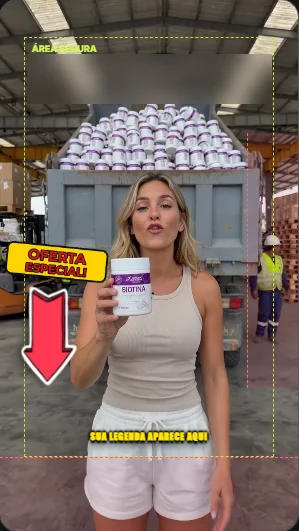
The app in 40 seconds

See the workflow. Imagine the time you’ll save.And the time you save.

From takes to the render queue: see the main steps of MM Creative Pro in a short walkthrough.

Narration in Portuguese — the app itself is fully available in English. AI avatar presentation with illustrative demos of the features.

Output examples

One script. Dozens of versions.

Each video below is a different combination of hook, body and ending, assembled and rendered by the app.

Real output from the app: 16 versions of the same perfume campaign. 6-second clips, no sound. Hover to play.Tap a video to play.

How it works

From raw footage to finished video

  1. 1

    Organize your takes

    Drag in videos or import numbered folders. Use two, three or more groups of takes, depending on your script.

  2. 2

    Set the combinations

    See the maximum number of unique videos. Adjust captions, titles, arrows and transitions in the preview before rendering.

  3. 3

    Batch render

    Follow the queue and download the results. Your videos come out as MP4, with the option to download the whole batch as a ZIP.

Creative control

Production at scale. Details under your control.You’re in control.

It’s not just multiplying files. It’s assembling, adjusting, checking and delivering videos consistently.

Preview of a 9:16 video in MM Creative Pro, with title, caption and arrow
9:16 preview with safe area
  • 01

    Preview before rendering

    Check the layout and the safe margins.

  • 02

    Captions on the video

    Choose style and position, or turn them off whenever you want.

  • 03

    Titles and arrows

    Place visual elements right on the preview.

  • 04

    Finishing and export

    Trim start and end, adjust speed and transitions.

Black Friday

Pay once. Use it for life.

What’s in the app

Everything you need to produce at volume.

  • Take combinations without repeating a full video
  • Batch editing by folder
  • Trims, speed and transitions
  • Titles, captions and arrows with a preview
  • Render queue and results as a ZIP
  • App fully in English, Portuguese and Spanish
Until Dec 2

Lifetime license

Software for Mac and Windows, on up to 2 computers.

US$97one-time

Get my lifetime license
  • One-time payment, no subscription
  • No expiration date
  • Future updates included, right in the app
  • Key by email within minutes

Guarantee and support

Try it on your computer, with your videos.

  • 7-day unconditional guarantee through Kiwify
  • 100% refund within that period
  • Email support
  • Switching computers? Support frees the slot

Buy by December 2, 2026 and your license is lifetime, with future updates included. From December 3, 2026, new purchases get a 1-year license.

Frequently asked questions

Before you start.

No. You can work with two, three or more groups of takes, depending on how your video is structured.

A full combination of takes never repeats within a batch. By default it also avoids reusing pairs of scenes. If you want more versions, you can allow pairs to be reused while keeping every full combination unique.

Yes. Captions are optional. When turned on, they are burned directly into the rendered video.

The interface opens in your browser, while all processing happens locally on your computer. It works on Mac and Windows.

Buy by December 2, 2026 (Black Friday) and your license is lifetime: pay once and use it with no expiration date, including future updates. From December 3, 2026, new purchases get a 1-year license.

Your license can be activated on up to 2 computers (Windows or Mac). If you switch computers, email suporte@mmcreativepro.com and we’ll free up the slot.

Internet is needed to activate the license and for periodic checks. Once activated, the app keeps working for up to 7 days offline. Your videos are processed on your computer and are never uploaded to any server.

Yes. macOS shows this warning for apps installed outside the App Store. It takes less than a minute to allow it: see the step-by-step guide. On Windows, if you see "Windows protected your PC", click More info and then Run anyway.

You get a 7-day unconditional guarantee through Kiwify. If the app isn’t right for you, request a refund within that period and get 100% of your money back.

Your key arrives at your purchase email within a few minutes. Check your spam and Promotions folders. If you can’t find it, request it again here or email suporte@mmcreativepro.com.

Requirements

Before you buy, check your computer.check your PC.

More creating. No subscription.

7-day guarantee: not for you? 100% refund through Kiwify, no questions asked.